





Network Automation with Ansible
Ansible is an open-source automation platform designed to simplify IT orchestration, configuration management, and application deployment. It uses simple, human-readable YAML files (called playbooks) to define automation tasks, eliminating the need for complex scripting. Ansible is agentless, meaning it communicates with devices over standard protocols like SSH or API, without requiring additional software on the managed nodes.
Automating VyOS with Ansible – Key Benefits
VyOS is a powerful open-source network operating system that provides enterprise-grade routing, firewall, and VPN capabilities. Automating VyOS configuration with Ansible delivers:

Consistency
Apply uniform configurations across multiple VyOS routers with a single command.

Scalability
Easily manage large deployments, from lab environments to production networks.

Speed
Reduce provisioning and update times from hours to minutes.

Flexibility
Integrate VyOS automation into broader workflows, including multi-vendor and cloud environments.

Reliability
Use version-controlled playbooks for repeatable, predictable changes and quick rollbacks.
By combining Ansible’s simplicity with VyOS’s flexibility, network teams can build agile, efficient, and easily maintainable infrastructures, ready to meet the demands of today’s digital landscape.


Want to learn more about VyOS Technical Capabilities?
Download the Technical Datasheet


 Technical Datasheet
How Ansible Works
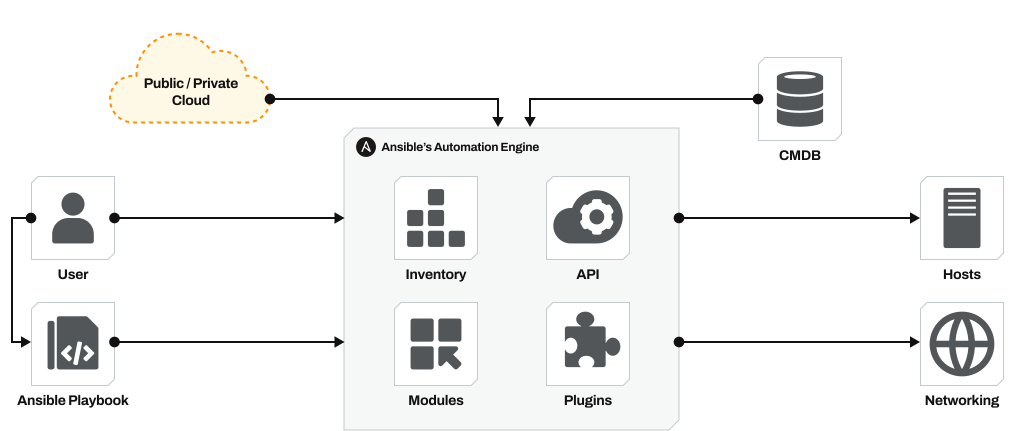
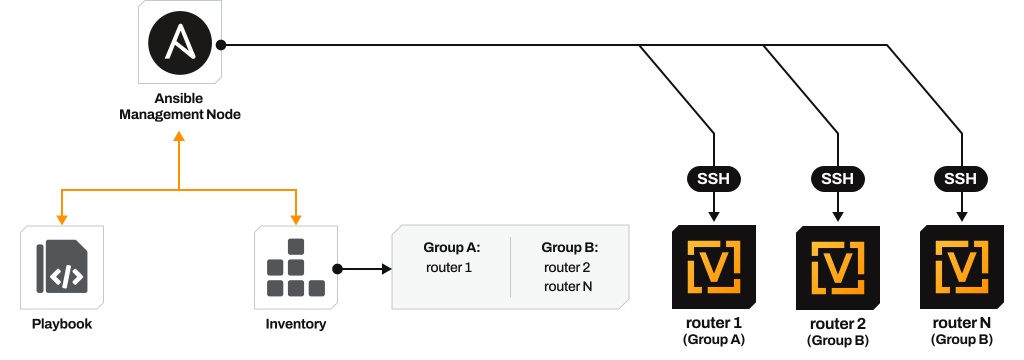
Ansible is an automation platform that uses playbooks (written in YAML) to define tasks such as configuring devices, installing software, or deploying services. It works in a push-based model: from a control node (where Ansible is installed), it connects to managed devices such as VyOS routers, over standard protocols like SSH or via APIs. No agent software is required on the devices, which keeps deployment simple and secure.
A typical Ansible workflow involves

Inventory
A list of devices or hosts to manage.
Modules
Reusable pieces of code that execute specific tasks (e.g., configure an interface).
Playbooks
Sets of automation instructions in YAML format.
Execution
Ansible reads the playbook and applies the changes to the devices in the inventory.
Ansible collections are packages of automation content. They can contain
Modules
To perform specific tasks.
Roles
Predefined automation structures for common workflows.
Plugins
To extend Ansible's functionality.
Documentation & Examples
To guide usage
Network Automation with Ansible and VyOS
Download Solution Brief
Collections make it easier to distribute, install, and use automation content for specific vendors or technologies. Once installed, you can use VyOS modules in your playbooks.
With VyOS Ansible collection vyos.vyos, network engineers can standardize and accelerate configuration tasks, integrate VyOS into multi-vendor workflows, and ensure consistent deployments across the entire network.
Collections make it easier to distribute, install, and use automation content for specific vendors or technologies. Once installed, you can use VyOS modules in your playbooks.
With VyOS Ansible collection vyos.vyos, network engineers can standardize and accelerate configuration tasks, integrate VyOS into multi-vendor workflows, and ensure consistent deployments across the entire network.
Helpful Resources
Here are some helpful resources for VyOS with Ansible automation


Resources
Here are some resources to help you learn more about VyOS, keep up with the development, and participate in it.


