
Broadband Network Gateway (BNG)




Introduction
A Broadband Network Gateway (BNG) - also known as a Broadband Remote Access Server (BRAS)—is a critical network function in service provider networks. It acts as the aggregation and termination point for broadband subscriber sessions, managing traffic from residential and enterprise customers accessing the internet or private services. It handles essential functions like establishing sessions, user authentication, IP address assignment, enforcing traffic policies and QoS, and track usage for billing and analytics.
A configurable Broadband Network Gateway (BNG) will help you overcome this need, as you can allow your router to communicate with external devices and servers in order to establish connectivity with your subscribers through logical sessions.
There are two types of logical sessions
PPPoE Subscriber Session
The PPP-over-Ethernet (PPPoE) subscriber session is established using the point-to-point protocol (PPP) that runs between the customer-premises equipment (CPE) and the broadband network gateway (BNG). It is designed for managing how data is transmitted over Ethernet, and it allows a single server connection to be divided between multiple clients.
IPoE Subscriber Session
The IP-over-Ethernet (IPoE) subscriber session is established using the IP connection that runs between the CPE and the BNG; IP addressing is done using the DHCP protocol. IPoE is essentially DHCP triggered subscriber interfaces. Users are “authenticated” through the combination of incoming interface and MAC address. This identifies the physical location of the user based on the queue they are connected to.
Key Benefits

Cost-Effective
Reasonable and competitive pricing so you can get maximum flexibility

Unified
Unified CLI for management to configure and setup your BNG so you can forget about using multiple applications/Configuration interfaces

Identity
Integration with AAA server that authenticates subscribers and keeps an account of subscriber sessions

DHCP
Acts as DHCP server to provide IP addresses to the clients

Layers Connectivity
Provides both Layer 2 and Layer 3 connectivity and routes IP traffic through an internet service provider’s backbone network to the internet

Firewall
Applies limits to the services provided to customers, limiting access to sensitive data or valuable resources with a powerful firewall

Traffic Control
Guarantee quality of service (QoS) by ensuring or limiting the desired traffic
Broadband Network Gateway (BNG)
 Download Solution Brief
How does it work?
VyOS as BNG, works by using the ACCEL-PPP application, which is already integrated inside VyOS.
Both Protocols IPoE and PPPoE are supported. However we usually recommend using PPPoE sessions when deploying BNG.
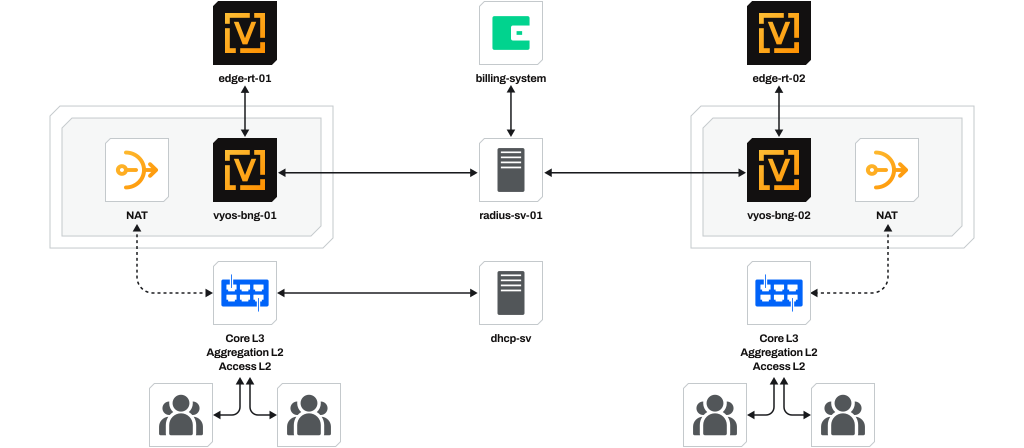
Following the recommendation, the "vyos-bng-01" device must be configured with PPPoE server containing:
You must sync your "billing system" to your "radius sv-01" server. This will grant you operational controls like traffic accounting and charges calculation.
Additionally you can apply QoS policies in order to limit or guarantee traffic by rules.


Want to learn more about VyOS Technical Capabilities?
Download the Technical Datasheet

 Technical Datasheet
Requirements to Deploy BNG
In order to deploy VyOS as BNG we should meet a couple requirements. First of all we need to know that Hardware requirements may vary depending on throughput being managed, the subscriber sessions quantity and additional features to be used on VyOS. You can use any VyOS Supported Hardware to deploy BNG.
We recommend the following specifications for each scenario:
For +2k sessions and a
throughput of 2Gbps
- At least 4 cores with 3 Ghz or more
- Minimum RAM of 8GB
For +10k sessions and a
throughput of 10Gbpsg
- At least 8 cores with 3 Ghz or more
- Minimum RAM of 16GB
For +2k sessions and a
throughput of 2Gbps
- At least 8 cores with 3 Ghz or more
- Minimum RAM of 16GB DDR
- An Intel X/XL710 NIC or Intel x520 NIC
- A RADIUS server in order to provide AAA (Authentication, Authorization and Accounting). If desired, you can use more than one RADIUS server.
- A Billing system with a Database
- An Edge Router device
Resources
Here are some resources to help you learn more about VyOS, keep up with the development, and participate in it.


